 العربية
 Deutsch
 English
 Español
 Français
 Italiano
 Português
 Русский
 Türkçe
 Tiếng Việt


WebP vs. PNG vs. JPG: The Definitive Web Performance, Compression, and Visual Fidelity Guide
Discover which image format maximizes visual sharpness while slashing page weight and boosting Core Web Vitals.
 By LinkeFly Editorial Team
According to HTTP Archive metrics, visual media constitutes over 60% of the total byte weight transferred during an average website page load. Unoptimized images are the single most common cause of slow Largest Contentful Paint (LCP) times, high server bandwidth costs, and poor Google PageSpeed Insights scores.
For decades, developers were forced to make a stark binary choice: use JPEG for photograph compression at the cost of transparency, or use PNG for pixel-perfect transparency at the cost of massive file size overhead. The rise of modern formats like WebP has fundamentally transformed web optimization.
In this technical master guide, we compare WebP, PNG, and JPEG across compression algorithms, visual fidelity curves, and mobile performance benchmarks.
1. The Contenders: Technical Architecture
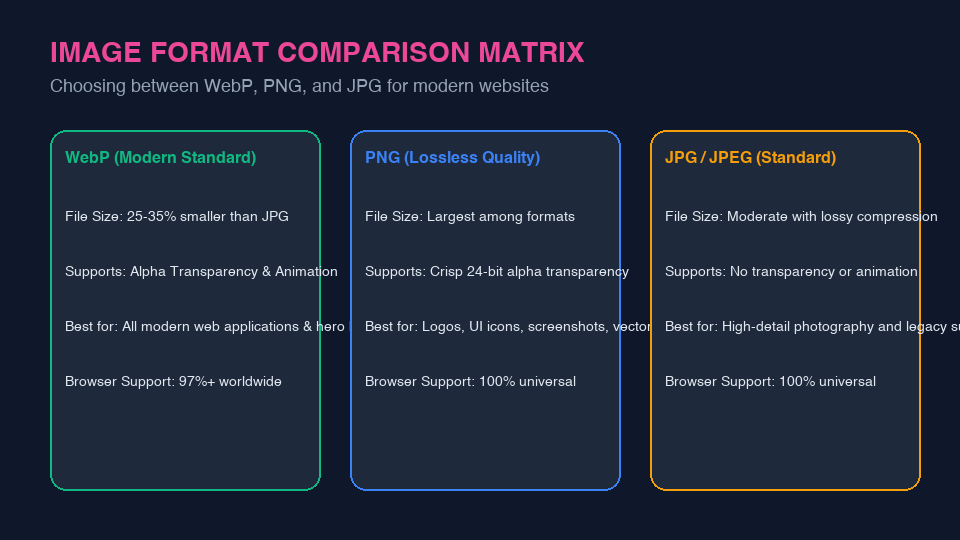
A. WebP (The Modern Web Standard)
Developed by Google, WebP utilizes predictive coding based on the VP8 video codec framework to compress images:
- Lossy WebP: Achieves file sizes 25% to 34% smaller than equivalent JPEG images at identical Structural Similarity (SSIM) index ratings.
- Lossless WebP: Achieves file sizes 26% smaller than PNG while preserving full 24-bit alpha transparency.
- Universal Support: Supported by over 97.5% of modern web browsers globally (Chrome, Safari, Edge, Firefox, Opera).
B. PNG (Portable Network Graphics: Lossless Standard)
PNG relies on DEFLATE compression (a combination of LZ77 and Huffman coding) to preserve exact pixel data without any loss of color information.
- Strengths: Razor-sharp edges, flawless typography rendering, 8-bit and 24-bit alpha transparency channels.
- Weaknesses: Substantially heavier byte payload. Uploading raw photographic PNGs can easily result in 2 MB to 5 MB hero assets that cripple mobile loading.
C. JPG / JPEG (Joint Photographic Experts Group: Legacy Standard)
JPEG employs lossy Discrete Cosine Transform (DCT) compression. It divides images into 8x8 pixel blocks and discards high-frequency color variations less noticeable to human visual perception.
- Strengths: Universal compatibility across every legacy browser, software application, and operating system in existence.
- Weaknesses: Lacks alpha transparency support, suffers from blocky compression artifacts around sharp contrast edges and typography.
2. The Compression Curve: Finding the 80% Sweet Spot
One of the biggest mistakes webmasters make is saving JPEG or WebP assets at "100% Quality". In digital imaging, saving at 100% quality bloats the file size exponentially with almost zero perceptible improvement in human visual perception:
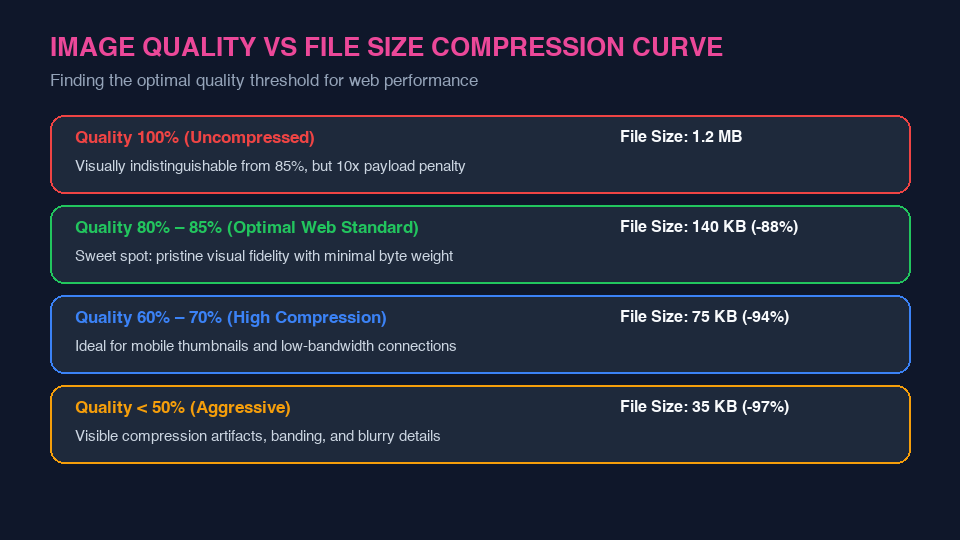
| Quality Setting | File Size (1920x1080 Photo) | Visual Fidelity (SSIM) | Recommendation |
|---|---|---|---|
| 100% Quality | 1,240 KB | 1.000 | Unnecessary for web; excessive bandwidth penalty. |
| 80% – 85% Quality | 145 KB (-88%) | 0.985 | Optimal Web Standard: Crisp, sharp, pristine visual quality. |
| 60% – 70% Quality | 75 KB (-94%) | 0.940 | Great for mobile thumbnails, secondary cards, background textures. |
| < 50% Quality | 35 KB (-97%) | 0.860 | Aggressive; noticeable color banding and pixelation. |
Convert and Optimize Images with LinkeFly
Transform heavy PNG and JPG assets into lightweight WebP images in seconds with our free browser tools:
3. Frequently Asked Questions (FAQ)
<picture> element: define <source srcset="image.webp" type="image/webp"> with an <img src="image.jpg"> fallback inside.Conclusion
Optimizing image formats is the single fastest way to reduce web page weight. By transitioning to WebP at 80-85% quality, you cut asset sizes by up to 80%, supercharge your Core Web Vitals, and deliver an instantaneous browsing experience.