Tiếng Việt
 العربية
 Deutsch
 English
 Español
 Français
 Italiano
 Português
 Русский
 Türkçe


How to Create SEO-Friendly URL Slugs: The Definitive Pillar Guide for Content Creators and Developers
Master the art and science of URL architecture, slug optimization, keyword placement, and 301 redirection.
 By LinkeFly Editorial Team
In the landscape of modern technical search engine optimization (SEO), webmasters obsess over backlinks, Core Web Vitals, and keyword density. Yet, one of the most foundational signals evaluated by both search algorithms and human users is frequently overlooked: the Uniform Resource Locator (URL) slug.
A well-architected URL slug serves as an unambiguous digital signpost. It informs search engine crawlers (such as Googlebot, Bingbot, and Yandex) about the semantic focus of your content before they parse a single paragraph of HTML. Simultaneously, it gives prospective visitors the confidence to click your link in crowded search engine results pages (SERPs), social feeds, and email newsletters.
In this comprehensive master guide, we explore the deep technical mechanics of URL slugs, examine empirical ranking data, dissect common URL anti-patterns, and provide an actionable framework for crafting high-converting, evergreen URLs.
1. What Exactly is a URL Slug? (Anatomy of a Web Address)
To understand the function of a slug, we must first break down the complete anatomy of a modern web address under the URI specification (RFC 3986):
https://linkefly.xyz/blog/how-to-create-seo-friendly-url-slugs
|---1---| |-----2-----| |-3--| |----------------4-----------------|
Protocol Domain Path URL Slug- Protocol / Scheme (
https://): Dictates the cryptographic transport layer (SSL/TLS). - Host / Domain (
linkefly.xyz): Identifies the web server and brand authority. - Subdirectory / Route Path (
/blog/): Represents the architectural silo or category. - URL Slug (
how-to-create-seo-friendly-url-slugs): The unique, human-readable identifier specifically targeted to the content of the individual page.
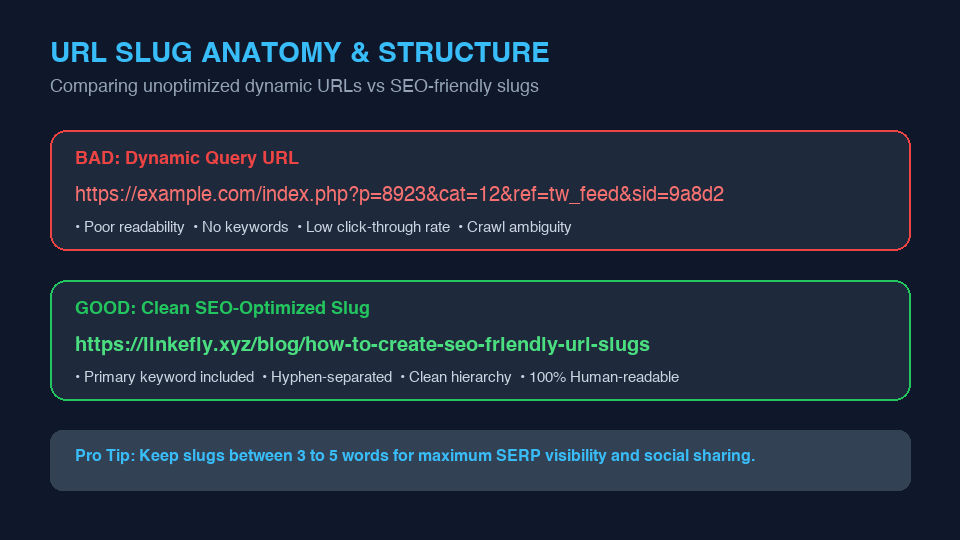
2. Why URL Slugs Directly Impact Search Rankings and CTR
While Google representatives have stated that keywords in URLs are a "very lightweight ranking factor," their compounding indirect benefits on user experience and organic performance are massive:
A. Dramatically Higher Organic Click-Through Rates (CTR)
In SERPs, users make split-second decisions. Multiple eye-tracking studies confirm that searchers scan the displayed URL right after reading the page title. When your slug reads /how-to-create-seo-friendly-url-slugs, users immediately understand that clicking will solve their query. In contrast, an unoptimized URL such as /article?id=94812&session=abc4 appears spammy, unintelligible, and raises security concerns.
B. Anchor Text for Naked URLs
When external webmasters, Reddit users, or forum members cite your content by pasting your raw link, a clean slug automatically turns the URL itself into rich anchor text containing your primary keyword. This provides contextual link equity without risking over-optimization penalties.
C. Topical Crawl Efficiency
Search engine algorithms use the directory and slug path to build a topical graph of your website. Grouping related topics under clean, semantic slugs reinforces topical authority across thematic clusters.
3. The 7 Golden Rules of SEO-Friendly Slug Architecture
Follow these rigorous technical guidelines every time you publish a new article, product page, or tool utility:
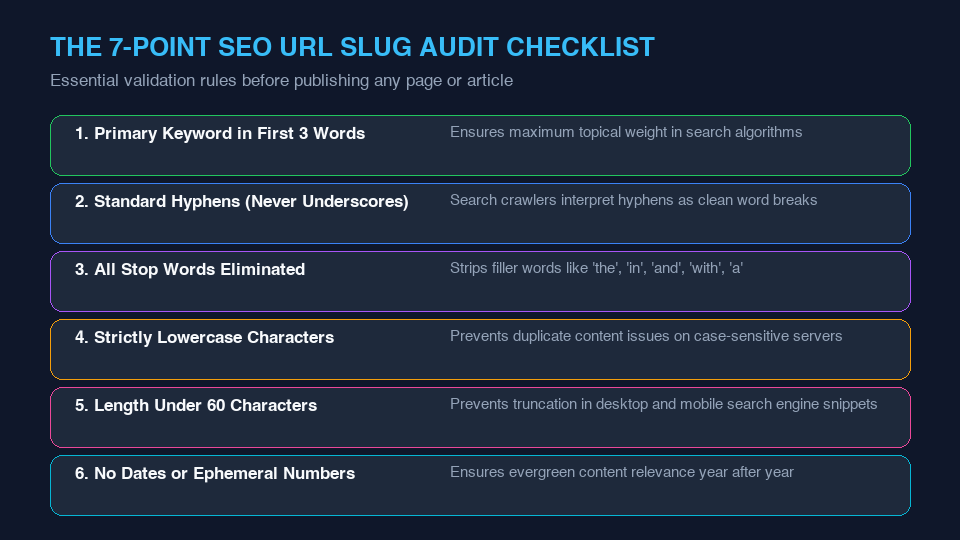
Rule 1: Always Use Hyphens, Never Underscores
Google officially treats hyphens (-) as word delimiters, while underscores (_) are treated as word joiners. For example:
seo-friendly-slugs→ Interpreted as three distinct words: "seo", "friendly", "slugs".seo_friendly_slugs→ Interpreted as a single token: "seofriendlyslugs", hindering exact-match keyword parsing.
Rule 2: Strip All Stop Words
Stop words are common filler words that add character bloat without adding topical value (e.g., the, a, in, on, of, and, with, for, to, is). Removing them keeps slugs focused on core semantic entities:
| Article Headline | Poor Slug (Unedited) | Optimized SEO Slug |
|---|---|---|
| How to Create the Best SEO Friendly URL Slugs in 2026 | /how-to-create-the-best-seo-friendly-url-slugs-in-2026 |
/how-to-create-seo-friendly-url-slugs |
| The Ultimate Guide to Understanding Base64 Encoding | /the-ultimate-guide-to-understanding-base64-encoding |
/understanding-base64-encoding |
| Top 10 Tips for Optimizing Your Web Images for Faster Speed | /top-10-tips-for-optimizing-your-web-images-for-faster-speed |
/optimize-web-images-page-speed |
Rule 3: Enforce Strict Lowercase Across Your Web Server
Linux-based web servers (Nginx, Apache) are strictly case-sensitive. While example.com/Blog and example.com/blog might appear identical to human eyes, a web server treats them as two completely distinct resources. If both exist, Google may flag them for internal duplicate content or dilute PageRank between two versions. Always enforce automated lowercase rewriting.
Rule 4: Keep It Under 60 Characters (3 to 5 Words)
Shorter URLs are easier to share, fit comfortably in social media embeds without truncation, and allow users on mobile browsers to view the complete context inside narrow address bars.
Rule 5: Avoid Dates and Version Numbers for Evergreen Assets
Including dates (e.g., /best-seo-tools-2023) forces you to either implement messy 301 redirects when updating content for subsequent years or maintain an outdated URL that discourages clicks. Keep slugs date-agnostic so your content remains evergreen.
4. Managing URL Migrations: The Right Way to Use 301 Redirects
If you have existing pages with messy or unoptimized slugs, should you change them? Exercise caution.
If an existing URL already has high search rankings, strong organic traffic, and authoritative external backlinks, changing the slug introduces temporary ranking fluctuations while search engines update their index. However, if an optimization is necessary:
- Set up an immediate Permanent 301 Redirect from the legacy URL to the new slug.
- Update all internal links across your navigation, sidebar, and related posts to point directly to the new slug.
- Submit an updated
sitemap.xmlto Google Search Console to expedite re-indexing.
Automate Your URL Architecture with LinkeFly
Never worry about manual hyphenation, accents, or illegal character filtering again. Generate clean, lowercase, keyword-rich slugs in under a second with our free utility:
Open LinkeFly Text to Slug Generator →5. Frequently Asked Questions (FAQ)
é into %C3%A9). This looks ugly, increases character length, and breaks plain text sharing. It is best practice to transliterate accented letters into plain Latin equivalents (e.g., e)./tools/ or /blog/ help organize large websites and establish clear breadcrumbs in Google snippets. However, avoid excessive nesting (e.g., /category/subcat/2026/04/post/) as deep hierarchy dilutes page authority and increases URL length.Conclusion
Crafting high-quality URL slugs is a high-impact technical habit that yields permanent organic benefits. By eliminating stop words, using clean hyphens, and keeping your slugs concise and keyword-focused, you establish a resilient, user-friendly foundation that search engines reward.