Tiếng Việt
 العربية
 Deutsch
 English
 Español
 Français
 Italiano
 Português
 Русский
 Türkçe


The Complete Guide to Custom QR Codes: Business Strategies, Error Correction, and High-Conversion Campaigns
Discover how enterprise brands leverage customized 2D barcodes to bridge physical collateral with high-converting digital funnels.
 By LinkeFly Editorial Team
From modest beginnings in 1994 as an industrial inventory tracking system invented by Denso Wave engineer Masahiro Hara, the Quick Response (QR) code has evolved into the universal physical-to-digital conduit of the modern global economy.
Today, over 89 million smartphone users in the United States alone interact with QR codes annually. What was once seen as a clumsy gimmick is now an indispensable component of product packaging, conference badges, omnichannel retail, contactless payments, and direct-response advertising.
In this technical and strategic master guide, we explore the internal anatomy of QR codes, analyze the mathematics of Reed-Solomon error correction, and provide enterprise-tested best practices for launching high-scan marketing campaigns.
1. The Engineering Anatomy of a 2D QR Code Matrix
Unlike conventional 1D barcodes (such as UPC or Code 128) that encode information along a single horizontal axis using variable-width black bars, a QR code is a two-dimensional matrix symbology. It stores information both horizontally and vertically across a grid of black and white square modules.
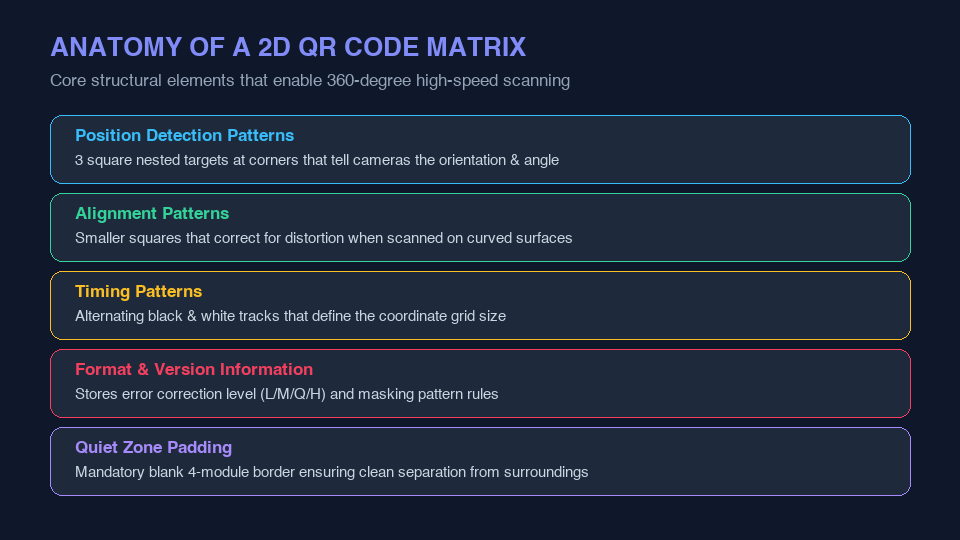
Key Matrix Components Explained:
- Position Detection Patterns (Finder Patterns): The three prominent concentric squares situated at the top-left, top-right, and bottom-left corners. These enable mobile cameras to instantly detect the code, determine its scale, and decode it from a full 360-degree orientation.
- Alignment Patterns: Smaller square targets embedded across larger QR code versions. These allow the decoder to correct for matrix distortion when a code is printed on curved surfaces (such as beverage cans or cardboard cylinders).
- Timing Patterns: Alternating rows of black and white modules connecting the finder patterns, defining the precise grid coordinates for the scanning algorithm.
- Format & Version Information: Dedicated data areas storing the Error Correction Code (ECC) level and the data masking pattern applied.
- Quiet Zone (Margin): A mandatory blank border surrounding the matrix (minimum of 4 modules wide) that prevents visual interference from adjacent text and graphics.
2. Mastering Reed-Solomon Error Correction (ECC)
The crowning achievement of QR code engineering is its built-in resilience against physical damage, dirt, and tears, powered by the Reed-Solomon Error Correction algorithm. This mathematical redundancy allows a scanner to reconstruct missing data modules even when parts of the QR code are completely obstructed.
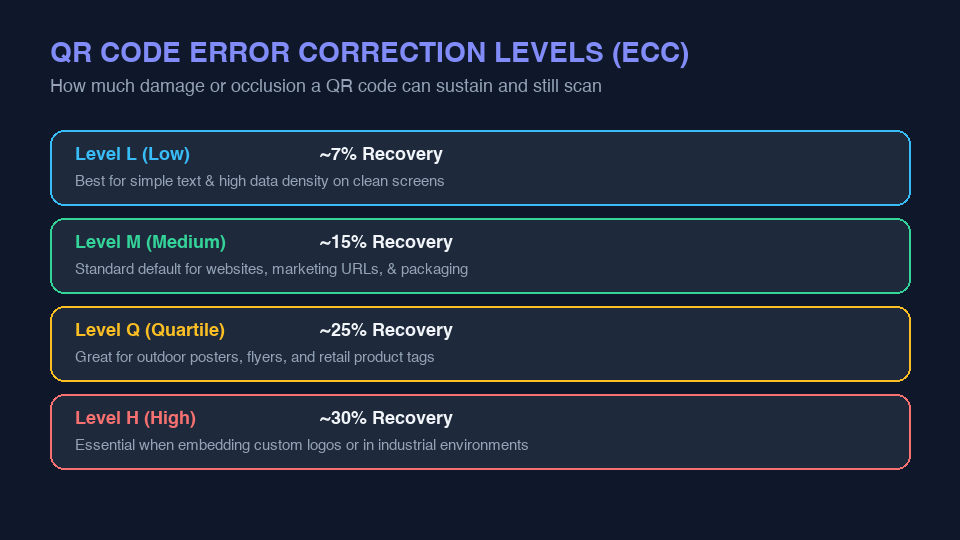
| ECC Level | Recovery Capacity | Data Density | Recommended Use Case |
|---|---|---|---|
| Level L (Low) | ~7% of bytes | Highest (smallest modules) | Clean digital screens, embedded in PDFs, high-capacity text strings. |
| Level M (Medium) | ~15% of bytes | Standard balance | Default industry standard for business cards, brochures, flyers, and menus. |
| Level Q (Quartile) | ~25% of bytes | Moderately high redundancy | Outdoor transit posters, packaging exposed to weather, industrial labels. |
| Level H (High) | ~30% of bytes | Lowest (largest modules) | Branded QR codes with centered company logos, heavy graphic customization. |
3. High-Conversion Business Use Cases for Custom QR Codes
Modern businesses deploy custom QR codes across omnichannel consumer touchpoints to drive measurable ROI:
Smart Product Packaging
Allow buyers to instantly verify batch authenticity, access interactive video assembly manuals, view allergen disclosures, and register warranties directly from their smartphones.
Frictionless Contactless Payments
Streamline hospitality and retail operations with tabletop QR cards that load digital menus, accept Apple Pay / Google Pay, and collect customer feedback without hardware terminals.
Digital vCards & Networking
Eliminate paper business cards by letting prospects scan your personalized vCard QR code at trade shows to save your phone, email, and social profiles directly to their contacts app in one tap.
Instant Wi-Fi Access
Generate a secure Wi-Fi QR code for office visitors and café guests, letting them connect to your guest network with a single camera scan—eliminating frustrating manual password entry.
4. Design Best Practices: How to Prevent Scan Failures
- Maintain High Contrast: Ensure high contrast between foreground modules and background color (e.g., dark blue modules on a white background). Avoid light modules on a dark background unless verified across multiple device sensors.
- Respect the Quiet Zone: Never crop the outer border. Scanners need at least 4 modules of uninterrupted blank margin to isolate the matrix from surrounding design elements.
- Test Across Multiple Devices: Test your printed proof on budget Android phones, high-end iPhones, and under varying lighting conditions before running large print batches.
Generate Production-Ready QR Codes for Free
Create custom, high-resolution QR codes for websites, Wi-Fi networks, contact vCards, or SMS text in seconds with LinkeFly:
Launch LinkeFly QR Code Generator →5. Frequently Asked Questions (FAQ)
Conclusion
Custom QR codes represent one of the most efficient, cost-effective marketing bridges in the modern business toolkit. By pairing thoughtful physical design with robust error correction and mobile-optimized landing pages, you create a seamless user journey that consistently drives higher conversions.