Русский
 العربية
 Deutsch
 English
 Español
 Français
 Italiano
 Português
 Türkçe
 Tiếng Việt


Mastering JSON: Debugging, Formatting, Schema Validation, and REST API Best Practices
Eliminate syntax errors, unhandled parse exceptions, and payload bloat across your full-stack engineering workflow.
 By LinkeFly Editorial Team
JavaScript Object Notation (JSON) is the lingua franca of the modern programmable internet. From distributed microservices and mobile REST APIs to NoSQL databases (MongoDB, DynamoDB, PostgreSQL JSONB) and application configuration manifests, billions of JSON payloads traverse network boundaries every second.
Yet, despite its ubiquitous adoption and deceptive simplicity, JSON remains a frequent source of painful production outages. A single misplaced comma, an unescaped double quote, or an unquoted object key can cause native parser methods like JSON.parse() to crash with unhandled syntax exceptions.
In this technical master guide, we examine the formal grammar of RFC 8259, dissect common anti-patterns, compare JSON against alternative data serialization protocols, and explore enterprise best practices for payload optimization.
1. The Strict Grammar of JSON: How It Differs from JavaScript
Because JSON shares its origin and syntax with JavaScript object literals, many developers erroneously assume that any valid JavaScript object is valid JSON. In reality, the JSON specification (RFC 8259 / ECMA-404) is an uncompromisingly strict grammar:
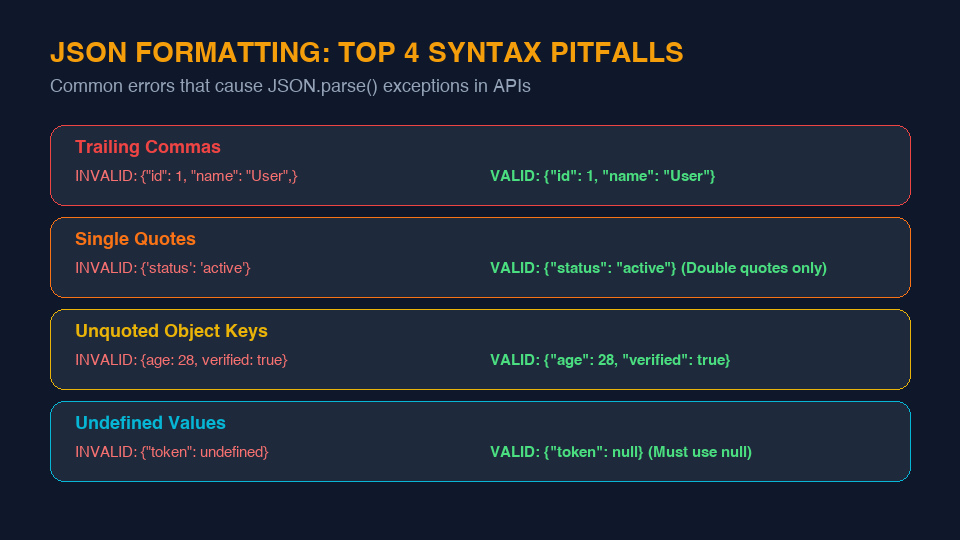
The 4 Most Common Syntax Pitfalls:
- Trailing Commas: Adding a comma after the final key-value pair in an object or array is valid in ECMAScript 5+, but strictly forbidden in standard JSON. A trailing comma will immediately throw a
SyntaxError. - Single Quotes: In JSON, all string literals and dictionary keys must be wrapped in double quotes (
"..."). Single quotes ('...') are completely invalid. - Unquoted Object Keys: While JavaScript permits
{ id: 101 }, JSON requires{ "id": 101 }. Every property key must be a valid quoted string. - Disallowed Data Types: JSON only supports six fundamental primitive and composite types:
string(UTF-8 encoded)number(integer or floating point)boolean(trueorfalse)nullobject(key-value collection)array(ordered list)
undefined, functions,Dateobjects,NaN, andInfinitycannot be serialized in JSON.
2. JSON vs. XML vs. YAML vs. Protocol Buffers
Selecting the optimal serialization format requires evaluating payload size, parse latency, and tooling support across your architecture:
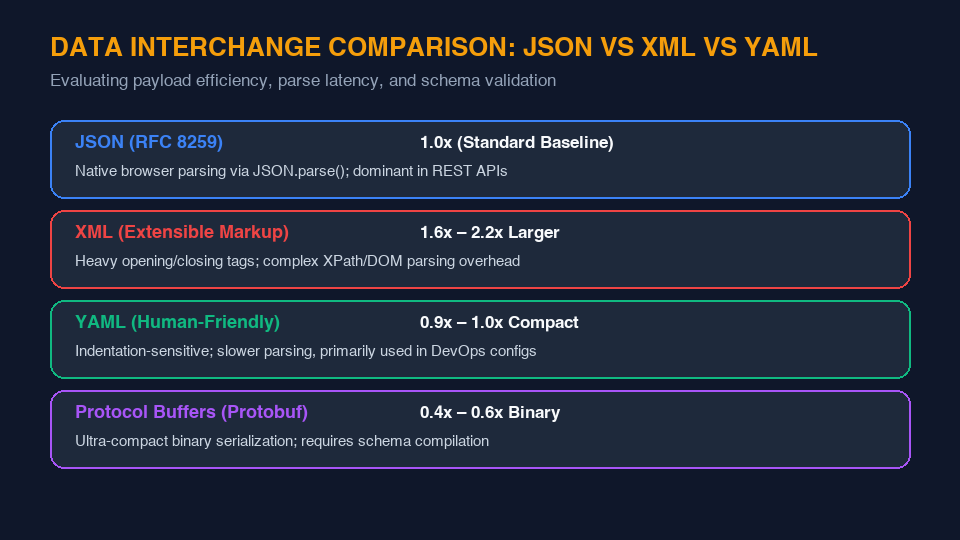
| Format | Relative Payload Size | Parse Speed | Best Suited For |
|---|---|---|---|
| JSON | 1.0x (Baseline) | Fast (Native C++ V8 engine) | REST APIs, browser clients, mobile apps, general web communications. |
| XML | 1.6x – 2.2x Larger | Slow (DOM/XPath overhead) | Legacy enterprise banking systems, SOAP services, document markup. |
| YAML | 0.9x – 1.0x Compact | Moderate (Whitespace sensitive) | DevOps configurations, Docker Compose, Kubernetes manifests, CI/CD pipelines. |
| Protobuf | 0.4x – 0.6x Binary | Ultra-Fast (Pre-compiled binary) | Internal microservices, gRPC, high-throughput financial backends. |
3. Engineering Best Practices for REST API Payloads
A. Pretty-Print in Dev, Minify in Production
During local development and QA testing, formatted JSON with two-space indentation saves countless hours of developer fatigue. In production, however, strip all whitespace using a JSON minifier to reduce egress bandwidth and network latency.
B. Set Accurate HTTP Headers
Always serve your API responses with the correct Content-Type header: Content-Type: application/json; charset=utf-8. Never serve JSON as text/plain or text/html.
C. Leverage JSON Schema for Automated Contract Testing
Implement formal JSON Schema validation on all inbound API payloads. Validating payload structures, data types, and required fields at the API gateway layer prevents corrupted data from entering your backend database.
LinkeFly Free JSON Developer Suite
Format, validate, edit, minify, and convert JSON structures directly in your browser with zero latency:
4. Frequently Asked Questions (FAQ)
"2026-10-04T11:30:00Z"), which can be parsed back into date objects across all programming languages.Conclusion
JSON has rightfully earned its place as the bedrock of web data interchange. By understanding its strict grammar, validating schemas rigorously, and formatting payloads cleanly, you build resilient, high-performance web systems.