Português
 العربية
 Deutsch
 English
 Español
 Français
 Italiano
 Русский
 Türkçe
 Tiếng Việt


How HTML and CSS Minification Dramatically Improves Page Speed and Core Web Vitals
A deep technical dive into bytecode reduction, TCP packet congestion windows, critical rendering paths, and Google Lighthouse scores.
 By LinkeFly Editorial Team
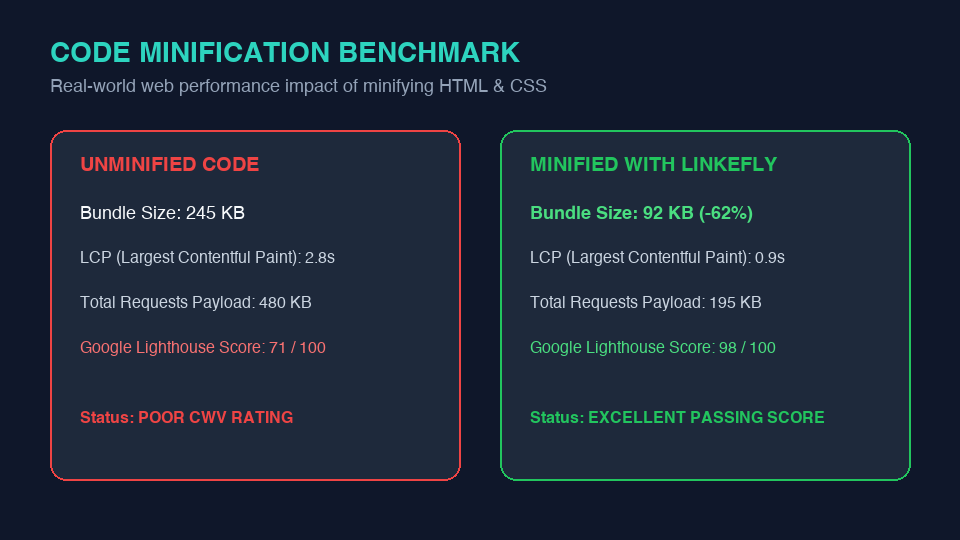
In an era where consumer expectations demand sub-second web responsiveness, website performance is no longer merely a technical luxury—it is a direct Google algorithmic ranking factor and a critical driver of business revenue. Studies by Google and Deloitte confirm that a 0.1-second improvement in mobile page speed boosts retail conversion rates by up to 8.4%.
Among the wide array of web performance optimizations, code minification remains one of the highest-ROI, lowest-risk practices available to modern software engineers. Yet, many teams misunderstand how minification interacts with network transport protocols and browser rendering engines.
In this technical master guide, we explore the deep networking physics of HTML, CSS, and JavaScript minification, evaluate its direct impact on Google's Core Web Vitals, and review best practices for automated production delivery.
1. What Happens Under the Hood During Minification?
When software engineers write source code, they format it for human comprehension. We use two- or four-space indentation, descriptive line breaks, explanatory comments, and structured naming conventions. While indispensable during software development, web browser layout engines (Blink, Gecko, WebKit) do not require any of this formatting to parse the Abstract Syntax Tree (AST) or construct the CSS Object Model (CSSOM).
Minification algorithms automatically analyze source files and execute the following transformations:
- Whitespace Elimination: Collapsing multiple spaces, tabs, and newline characters into single tokens or stripping them entirely.
- Comment Stripping: Removing all single-line (
//) and multi-line (/* ... */,<!-- ... -->) comments from the production payload. - Delimiter Optimization: Removing redundant trailing semicolons before closing curly braces in CSS (e.g.,
color: red; }becomescolor:red}). - Hex Code & Zero Unit Compression: Shortening 6-digit hex color codes to 3 digits where possible (
#ffffff→#fff) and dropping units from zero values (margin: 0px;→margin:0;).
2. The Networking Physics: TCP Slow Start & Congestion Windows
To understand why shaving 30 KB of CSS matters so drastically for First Contentful Paint (FCP), we must examine how the Transmission Control Protocol (TCP) delivers data over the internet.
When a browser initiates an HTTPS connection to a web server, the TCP handshake begins with an algorithm called TCP Slow Start. The server cannot immediately blast the entire web page at maximum bandwidth; instead, it sends an initial batch of data known as the Initial Congestion Window (initcwnd), which in modern TCP stacks is typically 10 TCP segments (approximately 14.6 KB).
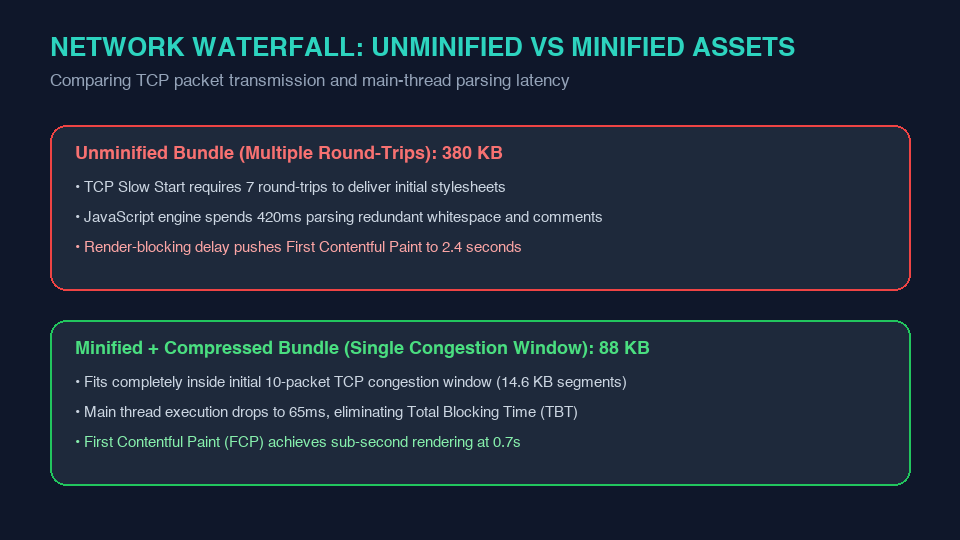
If your critical HTML and CSS file is 12 KB when minified and compressed, it fits completely within the very first round-trip. The browser receives the entire stylesheet immediately and begins rendering the page in under 50 milliseconds. If the stylesheet is 60 KB unminified, the server must wait for client ACK confirmations across 4 or 5 round-trips before the browser can even begin rendering!
3. The Direct Impact on Google Core Web Vitals
Google evaluates web performance through three standardized Core Web Vitals. Code minification directly impacts every single pillar:
| Core Web Vital | Target Threshold | Impact of Minification |
|---|---|---|
| LCP (Largest Contentful Paint) | ≤ 2.5 Seconds | CSS is a render-blocking resource. Minifying CSS unblocks the critical rendering path faster, allowing the browser to paint hero images and heading text without delay. |
| INP (Interaction to Next Paint) | ≤ 200 Milliseconds | Minified JavaScript takes significantly less time for the V8 engine to compile and evaluate, keeping the main thread free to respond to user clicks and taps instantly. |
| CLS (Cumulative Layout Shift) | ≤ 0.1 Score | Faster stylesheet parsing ensures that modern layout containers (flexbox/grid) are established before text and image elements render, eliminating visual layout jumps. |
4. Minification vs. Gzip & Brotli: Why You Need Both
A common misconception among web developers is that because their web server uses Gzip or Brotli compression, minification is unnecessary. This is demonstrably false.
- Compression (Gzip/Brotli) is a dictionary-based byte-stream compression algorithm. It finds repeated patterns in bytes and replaces them with pointers.
- Minification operates at the syntactic level. It permanently removes tokens that the browser does not need to parse.
When you minify code before feeding it to Brotli or Gzip, the compression dictionary is significantly smaller, yielding an additional 15% to 25% smaller final payload over the network. Crucially, once the browser decompresses the file, a minified file requires drastically less RAM and CPU parsing time to execute on mobile hardware.
Instant Code Minification Suite by LinkeFly
Compress HTML markup, CSS stylesheets, and JavaScript files instantly with zero build setup:
5. Frequently Asked Questions (FAQ)
eval(), or specific global variable names. Always test your production build..map files). Source maps map minified production code back to original source files inside browser Developer Tools without imposing performance penalties on end users.Conclusion
Minifying your HTML, CSS, and JavaScript is one of the foundational tenets of modern web engineering. By keeping your assets lean, you minimize TCP round-trips, optimize Core Web Vitals, and deliver an effortless, instantaneous experience for every visitor.