Français
 العربية
 Deutsch
 English
 Español
 Italiano
 Português
 Русский
 Türkçe
 Tiếng Việt


Text Sanitization and Delimiter Engineering: Cleaning Line Breaks, Commas, and Raw Data
How to transform messy spreadsheet exports, SQL lists, and unstructured text into clean data pipelines.
 By LinkeFly Editorial Team
Data scientists, software engineers, and digital marketers spend up to 80% of their operational hours on a single unglamorous task: data cleaning and text sanitization. Whether preparing raw customer lists for email marketing automation, formatting multi-row inputs for SQL IN (...) clauses, or converting messy spreadsheet copy into structured CSVs, raw human text is invariably plagued by formatting defects.
Hidden carriage returns (\r), inconsistent line feeds (\n), stray punctuation, and unescaped commas trigger parsing errors across database ETL pipelines and data warehouses. In this practical guide, we examine regular expression workflows, delimiter escaping specifications, and automated cleaning routines to streamline your text pipelines.
1. The Hidden Complexity of Line Breaks (CR vs LF)
One of the most frequent causes of corrupted file imports is the silent incompatibility between operating system line termination conventions:
- Windows Standard (CRLF -
\r\n): Inherited from mechanical typewriters where the carriage returned to the left margin (Carriage Return - ASCII 13) and the paper advanced one line (Line Feed - ASCII 10). - Unix / Linux / macOS Standard (LF -
\n): Modern POSIX systems simplify line termination to a single Line Feed byte (ASCII 10). - Legacy Classic Mac (CR -
\r): Systems prior to Mac OS X used a standalone Carriage Return (ASCII 13).
When Windows CRLF files are ingested by Linux-based cloud containers, downstream shell scripts frequently misinterpret the trailing \r as an unexpected control character, causing syntax crashes and broken string comparisons.
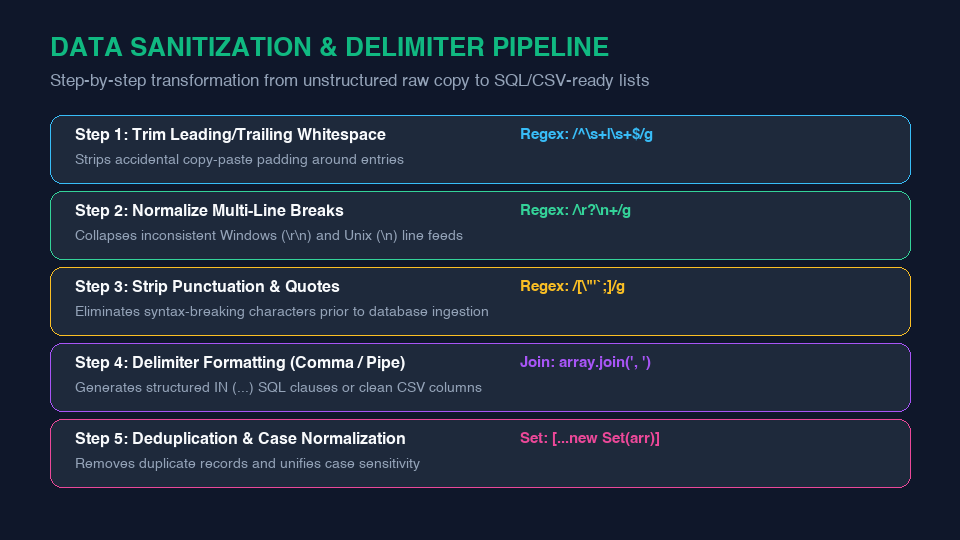
2. The 5-Step Delimiter Cleaning Pipeline
To convert arbitrary multi-line copy into a deterministic array of clean values, execute this standardized regex pipeline:
- Normalize Line Endings: Replace all variations of CRLF and CR with a uniform LF token:
const normalized = text.replace(/\r\n|\r/g, '\n'); - Trim Whitespace Padding: Strip accidental spaces and tab indents from each line boundary:
const lines = normalized.split('\n').map(l => l.trim()); - Filter Empty Lines: Remove blank lines caused by accidental double-enters:
const nonBlank = lines.filter(l => l.length > 0); - Deduplicate Entries: Eliminate duplicate IDs or email addresses using hash sets:
const unique = [...new Set(nonBlank)]; - Format with Target Delimiter: Join the sanitized array using commas, pipes, or SQL quotes:
const sqlInClause = unique.map(item => `'${item}'`).join(', ');
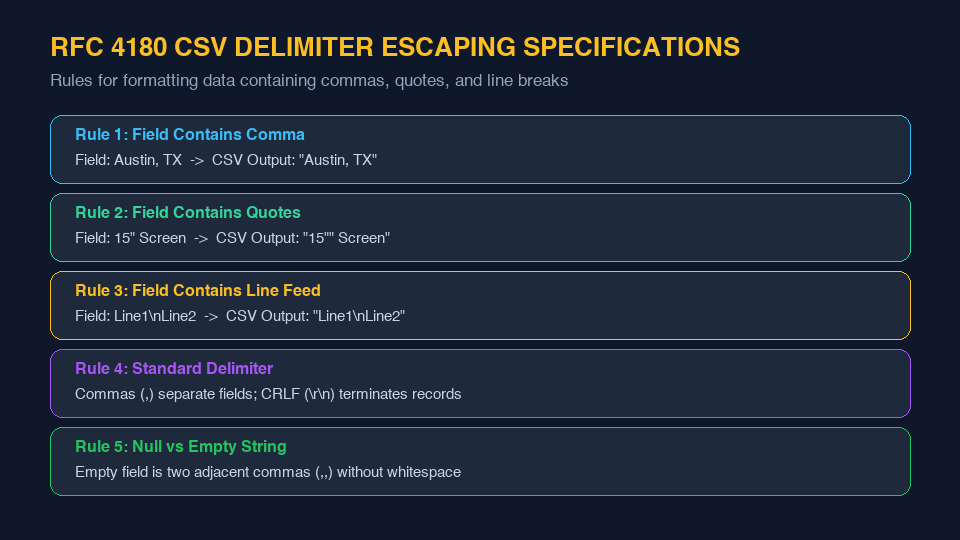
3. RFC 4180 Rules for CSV Delimiter Escaping
When formatting text into comma-separated values (CSV), simple string concatenation is insufficient if individual data fields contain commas or quotes themselves. RFC 4180 mandates:
- Any field containing a delimiter comma must be enclosed in double quotes:
Austin, TXbecomes"Austin, TX". - If a field contains literal double quotes, each quote character must be escaped by prepending another double quote:
15" Screenbecomes"15"" Screen".
Sanitize and Format Lists in One Click
Tired of writing quick scripts to format messy lists? Use LinkeFly's fast, client-side tools: strip irregular spacing with the Remove Line Breaks Tool and convert column lists into clean arrays with the Comma Separator Tool.
Frequently Asked Questions (FAQ)
/[\r\n]+/g. This matches single or consecutive occurrences of both Carriage Returns and Line Feeds, collapsing them cleanly.WHERE id IN (...) statements, string literals must be wrapped in individual single quotes ('id1', 'id2'). Pasting unquoted comma lists causes SQL syntax errors because the database engine interprets unquoted strings as column names or numerical constants.