English
 العربية
 Deutsch
 Español
 Français
 Italiano
 Português
 Русский
 Türkçe
 Tiếng Việt


UTM Tracking Parameters and GA4 Attribution: The Digital Marketer's Campaign Architecture Guide
Standardizing campaign taxonomies, preventing attribution leakage, and mastering Google Analytics 4.
 By LinkeFly Editorial Team
In performance marketing, there is an old axiom: "Half the money I spend on advertising is wasted; the trouble is I don't know which half." In the digital age, this dilemma should be obsolete. Modern attribution analytics allow marketers to trace every inbound click to its exact marketing dollar—provided your tracking links are architected with standardized Urchin Tracking Module (UTM) parameters.
Yet, without strict naming conventions and governance, marketing teams routinely corrupt their own analytics: splitting a single campaign across messy permutations like facebook, Facebook, fb, and FB_Ads. In this comprehensive guide, we unpack GA4 attribution models, define the 5 standard UTM parameters, and share automated workflows for building error-free campaign URLs.
1. The 5 Core UTM Parameters Explained
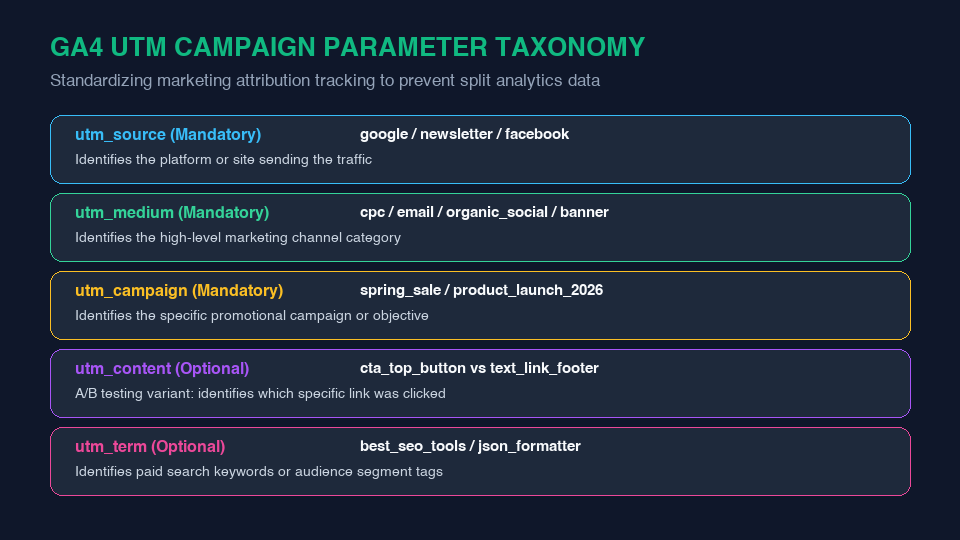
Originally created by Urchin Software (acquired by Google in 2005 to form Google Analytics), UTM tags are query parameters appended to URLs that inform analytics platforms about traffic origin:
A. Mandatory Parameters
utm_source(Platform): Identifies the specific site, search engine, or publisher delivering the click (e.g.google,newsletter,linkedin).utm_medium(Channel): Identifies the high-level marketing medium. GA4 uses this parameter to categorize traffic into Default Channel Groups (e.g.cpc,email,organic_social,affiliate).utm_campaign(Objective): Identifies the overarching strategic campaign, promotion, or seasonal event (e.g.black_friday_2026,q1_product_launch).
B. Optional Parameters
utm_content(Creative / Variant): Used for A/B testing to distinguish between different creative assets, button colors, or link placements within the exact same email or ad.utm_term(Keyword / Audience): Used primarily in paid search campaigns to track targeted bid keywords or demographic audience IDs.
2. GA4 Attribution Models: Data-Driven vs Last Click
Modern consumers rarely convert on their first visit. They might discover your software via organic search, click an Instagram retargeting ad on mobile, and ultimately convert three days later via an email promotion:
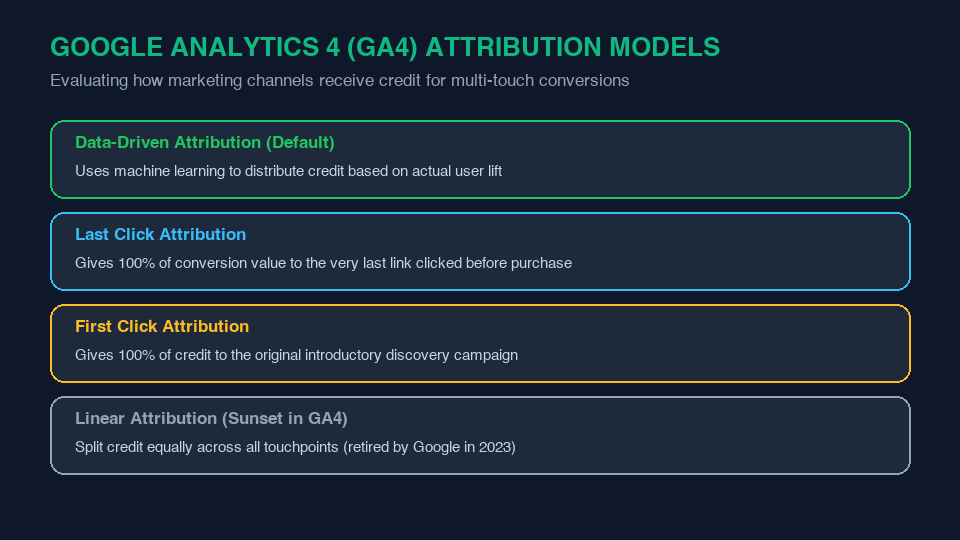
Google Analytics 4 defaults to Data-Driven Attribution (DDA), which uses advanced machine learning models to analyze converting and non-converting user paths, algorithmically distributing fractional conversion credit to each touchpoint based on its statistical lift.
3. The 3 Cardinal Rules of UTM Hygiene
- Strict Lowercase Characters Always: Analytics platforms are case-sensitive.
utm_source=twitterandutm_source=Twitterwill be tracked as two completely disjointed sources in GA4. Enforce strict lowercase across all marketing teams. - Use Underscores or Hyphens for Spaces: Never include raw spaces in UTM parameters, as they get converted to unsightly
%20strings in browser address bars. - Never Use UTMs on Internal Links: UTM tags should strictly track external inbound traffic. Appending UTM tags to internal header or sidebar banners will overwrite the original traffic source and inflate session counts artificially!
Build Compliant UTM URLs in Seconds
Eliminate tracking errors and broken parameters. Use LinkeFly's free UTM Builder Tool to automatically format, sanitize, and validate your campaign URLs, or inspect existing campaign links with our URL Parser Tool.
Frequently Asked Questions (FAQ)
<link rel="canonical" href="...">). Canonical tags instruct Googlebot to ignore tracking query parameters and attribute all ranking signals to the clean base URL.utm_medium does not match Google's predefined channel definitions. For example, using utm_medium=social-media instead of standard utm_medium=social will break GA4's default channel grouping rule.